Creative operations platform
Adey Studio
One workspace where creative teams search assets in natural language, build AI-native workflows, and take work from review to publishing.
The product
Story
Creative teams lose work in the gaps between tools: assets in one place, generation in another, feedback in email, publishing somewhere else.
Adey puts those steps in one workspace. Assets are found by describing them, workflows are built on a canvas by wiring models together, and review runs in context until the work is published.
Finding assets without tags
Search works on intent and visual content rather than filenames and tags. That matters because tagging is the step teams skip when they are busy, which is exactly when they most need to find an old asset. Describing what you are looking for is a habit that survives a deadline.
Workflows on a canvas
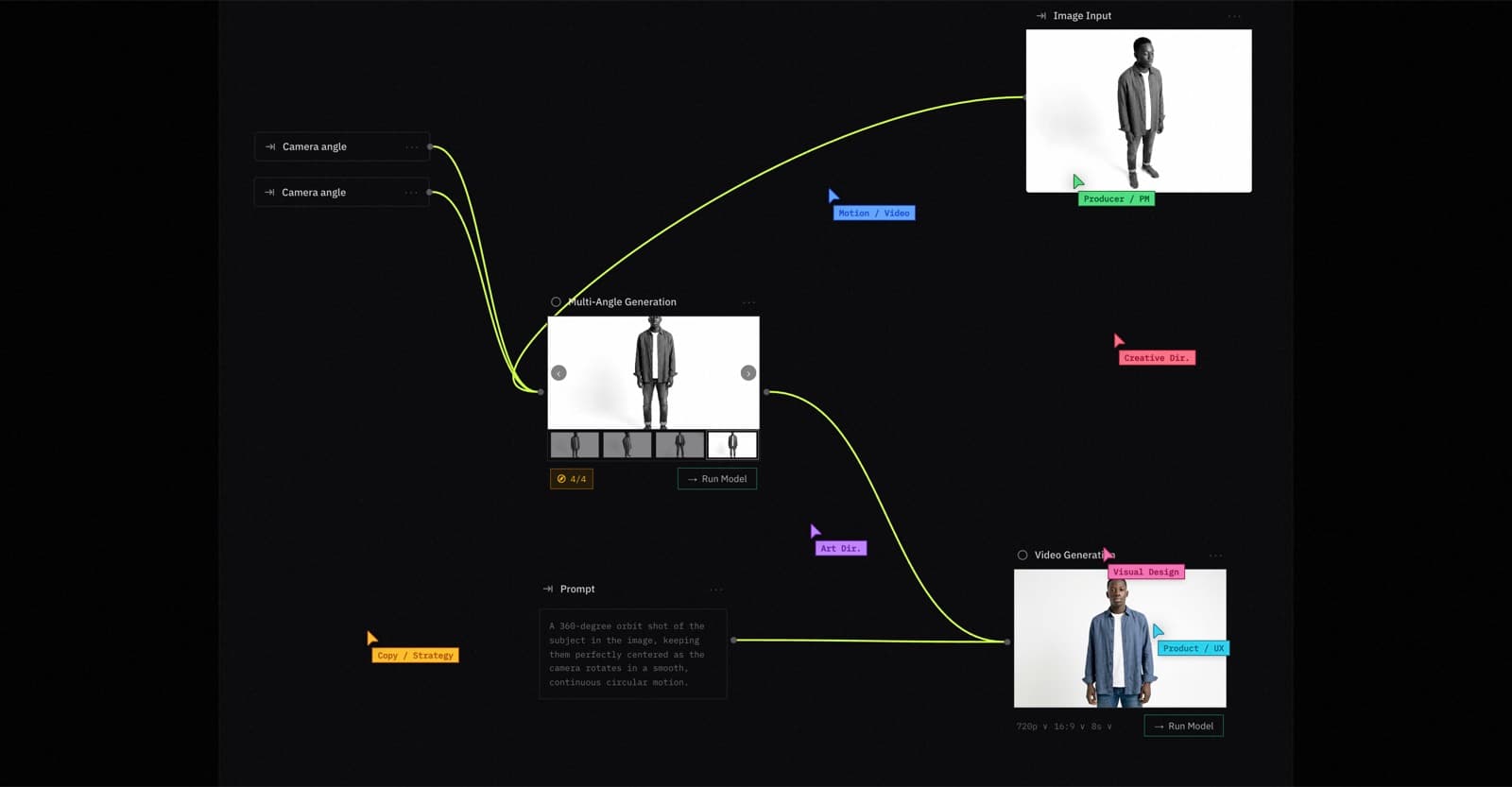
The node-based canvas is the core of the product. Models are chained into a workflow once, then run again whenever the same job comes up, so a repeatable creative task stops being a sequence of manual handoffs.
The example on the canvas is one image in, four camera angles generated, and a video out. The useful part is not any single model call. It is that the arrangement is saved, named and reusable.
Review in the same place as the work
Feedback and approvals happen in context, against the work itself, rather than in a thread that has to be reconciled with a file later. Review being inside the workspace is what lets a piece of work move from generated to approved to published without leaving the product.
Integrations at the edges
Eight tool integrations connect the workspace to where teams already keep and make things, spanning Adobe CC, Google Drive, Dropbox, OneDrive, OpenAI and Claude.
Adey deliberately does not try to replace those tools. It connects them, and the connective workflow is the product. Each integration sits at the edge behind its own interface, so a workflow step does not depend on which provider is behind it. That is the same integration discipline described in SaaS MVP architecture, and the same build-versus-buy reasoning set out in when to build custom software instead of buying: keep buying the tools that work, build the part that nobody sells.
Altogether the platform covers seven capabilities across search, workflow building, review and publishing.
Work of this kind runs as AI product development, a fixed-scope sprint for products where a model supports a defined task inside a usable workflow.
Impact
7
Platform capabilities
8
Tool integrations
Delivery
- Node-based canvas for chaining models into repeatable workflows
- Asset search by intent and visual content rather than tags
- Collaborative review with in-context feedback and approvals
- Integrations across Adobe CC, Google Drive, Dropbox, OneDrive, OpenAI and Claude
Related services and guides
Service
Ai Product Development
Service
Custom Software Development
Guide
SaaS MVP architecture: what to build in version one
Monolith, auth, database and API boundaries for a first SaaS product.
Guide
When to build custom software instead of buying
The cases where an owned build beats another subscription.
Guide
How to scope a first SaaS system in 14 days
Fix time and budget, then scope. One workflow, one system, a clear handover.